Posts

java.lang.UnsupportedClassVersionError: Bad version number in .class file? (Eclipse)

Image
Before hitting the solution let's get to know why this error occurs in java.So when JVM tries to load a class   and found that class version is not supported it throws  UnSupportedClassVersionError   and it generally  occurs if a higher JDK version is used to compile the source file and a lower JDK version is used to run the program. For example: if you have written your program using Java 1.6 and compiled also and now you run that program in 1.5 you will get the error   "java.lang.UnsupportedClassVersionError: Bad version number in .class file  [at java.lang.ClassLoader.defineClass1(Native Method)]". So now we come to how to resolve this issue in Eclipse. Right click on the project in Eclipse and click on Properties menu.After that click on Java Compiler menu. In right hand side uncheck use compliance check box and from the drop-down menu click the version you need .For me i have to select 1.6.After that click ok and clean your project.If again ...
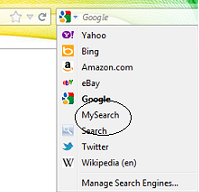
Firefox search bar plugin

Image
Hi Guys, We can do a little fun with Firefox search bar .We can create our own search engine there. Here i am creating a simple example of how you can create your own plugin. Go to the installed directory of Firefox and locate the folder "searchplugins" .Open this folder ,here you will see all the search engines xml listed there. You can copy paste the below code and restart Firefox to see your search engine in the drop down of search bar list. <SearchPlugin xmlns="http://www.mozilla.org/2006/browser/search/"> <ShortName>MySearch</ShortName> <Description>Demo search by google.. < /Description> <InputEncoding>UTF-8 < /InputEncoding> <Url type="text/html" method="GET" template="https://www.google.com/search"> <Param name="q" value="{searchTerms}"/> </Url> <SearchForm > https://www.google.com/ < /SearchForm> </SearchPlugin> an...

Ant build file to compile and clean resources

Hi, Below is a example for showing how to compile ,clean and make jar file of a project. Here i have given just a brief introduction of the tags how to use them. Advance build file structure i will include in coming post. Example: <?xml version="1.0"?> <project name="classroom" basedir="."> <property name="projectname" value="classroom" /> <property name="srcprop.dir" value="conf" /> <property name="build.dir" value="./compiled" /> <property name="src.dir" value="src"> </property> <target name="usage"> <echo message="------------" /> <echo message="Building ${projectname} project..." /> </target> <!--Create  directory --> <target name="init"> <mkdir dir="${build.dir}" /> <echo message="Compiled Dir...

Running all targets in ant through command prompt

Suppose you have an ant script build.xml to build the project which contains multiple targets inside it.If you are running the script through eclipse then you can enable or disable the targets by right clicking on build.xml and click on  " Run As " and in the popup window opened check or uncheck the targets. But how to do the same thing in command prompt. I have one little solution that worked for me. Suppose your build.xml contains some target like this :    <target name="init">   <tstamp>   <mkdir dir="${build}">   </mkdir></tstamp></target>   <target depends="init" description="compile the source " name="compile">   <javac destdir="${build}" srcdir="${src}">   </javac></target>   <target depends="compile" description="generate the distribution" name="dist"  >   <mkdir dir="${dist}/lib"  ...

Difference between Apache Server and Apache Tomcat

Apache is an HTTP server and Tomcat is a container . So Apache server can serve the  requests which are static in nature while Tomcat can serve the request which are dynamic. So if the pages are served in JSP/SERVLET then we have to use Tomcat container to interpret them. Similarly, if you will be using PHP then you need to add its support in Webserver. Webserver is used to just respond to the requests with feature such as load balancing, whereas containers( such as Tomcat) are used to manage the lifecycle of the pages generated using  JSP  and servlet.

Calling a URL with the help of HttpClient

Hi , You can call your jsp pages through HTTPClient .For that you just have to have commons-httpclient-*.jar. Any version of this jar will work. For the below code i was having commons-httpclient-3.1.jar. You can try the following lines to call your jsp page.. URL url = new URL("http://localhost/mywebapp/test.jsp")); HttpClient client = new HttpClient(); GetMethod get = new GetMethod(url.toString()); client.executeMethod(get); Other way is to make some timeout settings in Connection.For that you have to modify some connection properties like this: URL url = new URL("http://localhost/mywebapp/test.jsp"); HostConfiguration hcfg = new HostConfiguration(); hcfg.setHost(url.getHost(), url.getPort()); SimpleHttpConnectionManager connectionManager = new SimpleHttpConnectionManager(); HttpConnection connection = connectionManager.getConnection(hcfg); HttpConnectionParams conparams = connection.getParams(); conparams.setSoTimeout(timeout); conparams.setConnectionTime...

org.xml.sax. SAXParseException: Element type "web-app" must be declared.

Sometime you will notice these kinds of error messsges while deploying your web application to Tomcat.  org.apache.commons.digester.Digester - Parse Error at line 22 column 18: Element type "web-app" must be declared. org.xml.sax.SAXParseException: Element type "web-app" must be declared. at org.apache.xerces.framework.XMLParser.reportError(XMLParser.java:1213) at org.apache.xerces.validators.common.XMLValidator.reportRecoverableXMLError(XMLValidator.java:1807) at org.apache.xerces.validators.common.XMLValidator.validateElementAndAttributes(XMLValidator.java:3633) at org.apache.xerces.validators.common.XMLValidator.callStartElement(XMLValidator.java:1229) at org.apache.xerces.framework.XMLDocumentScanner.scanElement(XMLDocumentScanner.java:1806) at org.apache.xerces.framework.XMLDocumentScanner$ContentDispatcher.dispatch(XMLDocumentScanner.java:949) at org.apache.xerces.framework.XMLDocumentScanner.parseSome(XMLDocumentScanner.java:381) at org...